The Perceiver Resampler: A Deep Dive into Visual Information Bottlenecks
Understanding how modern multimodal models compress visual information for language models
Deep Learning
Computer Vision
Multimodal Models
Attention Mechanisms
Author
Rishabh Mondal
Published
February 11, 2025
Welcome to the World of Multimodal Architecture!
Have you ever wondered how models like GPT-4V, Google Gemini, or DeepMind’s Flamingo can “see” images and have conversations about them? The secret lies in a beautiful architectural component called the Perceiver Resampler.
What you’ll learn in this blog:
Beginner: Why we need special architectures to bridge vision and language
Intermediate: The elegant solution using learned latent queries and cross-attention
Advanced: Temporal encodings, Fourier features, and implementation details
Expert: Complexity analysis, training strategies, and architectural decisions
Prerequisites: Basic understanding of neural networks and attention mechanisms. Don’t worry if you’re rusty—we’ll build up from the basics!
Executive Summary
TL;DR - The Core Idea
The Perceiver Resampler solves a critical problem in multimodal AI: vision encoders produce thousands of tokens, but language models need fixed-size inputs.
Key Innovation: Instead of processing visual features directly, use a small set of learned latent queries (typically 32-64 vectors) that act as “information extractors.” Through cross-attention, these latents query the visual features and compress them into a fixed-size representation.
Why it works: The latents learn to ask task-relevant questions—“Is there a dog?”, “What color is the car?”—and extract only the information needed.
Complexity: Reduces attention from \(O(M^2)\) (quadratic in input size) to \(O(MN + LN^2)\) (linear in input, where \(N \ll M\)).
Part 1: The Problem - Bridging Two Worlds
1.1 The Vision-Language Marriage
Modern AI has achieved something remarkable: we can now have natural conversations with AI about both text and images. But this marriage of vision and language faces a fundamental challenge:
The Scale Problem
Input Type
Tokens
Attention Computations
1 Image (ViT)
~578 patches
~334,000
8 Images (video)
~4,624 patches
~21,380,000
30 Frames (video)
~17,340 patches
~300,720,000
Text (512 tokens)
512 tokens
~262,000
The issue: Vision models produce a LOT of data. A single image might produce thousands of tokens. A video? That’s tens of thousands easily.
Language models expect fixed input sizes. GPT-style models process sequences where computational cost grows quadratically with sequence length.
The Quadratic Problem
In transformers, attention computes relationships between every pair of tokens. If you have \(n\) tokens, you need \(n^2\) computations.
\[
\text{Attention Complexity} = O(n^2 d)
\]
Where \(n\) is sequence length and \(d\) is dimension. For 2,000 tokens at \(d=1024\): \[
2,000^2 \times 1,024 = 4,096,000,000 \text{ operations!}
\]
1.2 The Challenge: Variable Input, Fixed Output
We need a component that can:
✅ Accept variable-length visual input - 1 image, 8 images, 30 images… it should work with any number
✅ Produce fixed-size output - The language model needs a consistent representation
✅ Preserve important information - We can’t just randomly sample pixels!
✅ Be learnable - The model should figure out WHAT information matters
This is where the Perceiver Resampler enters the story.
Part 2: The Intuition - Building Understanding
2.1 The Library Analogy
Imagine you’re researching a topic and have access to a library with millions of books. You don’t have time to read everything, but you need enough information to write a comprehensive summary.
The Perceiver Resampler is like hiring a smart research assistant who:
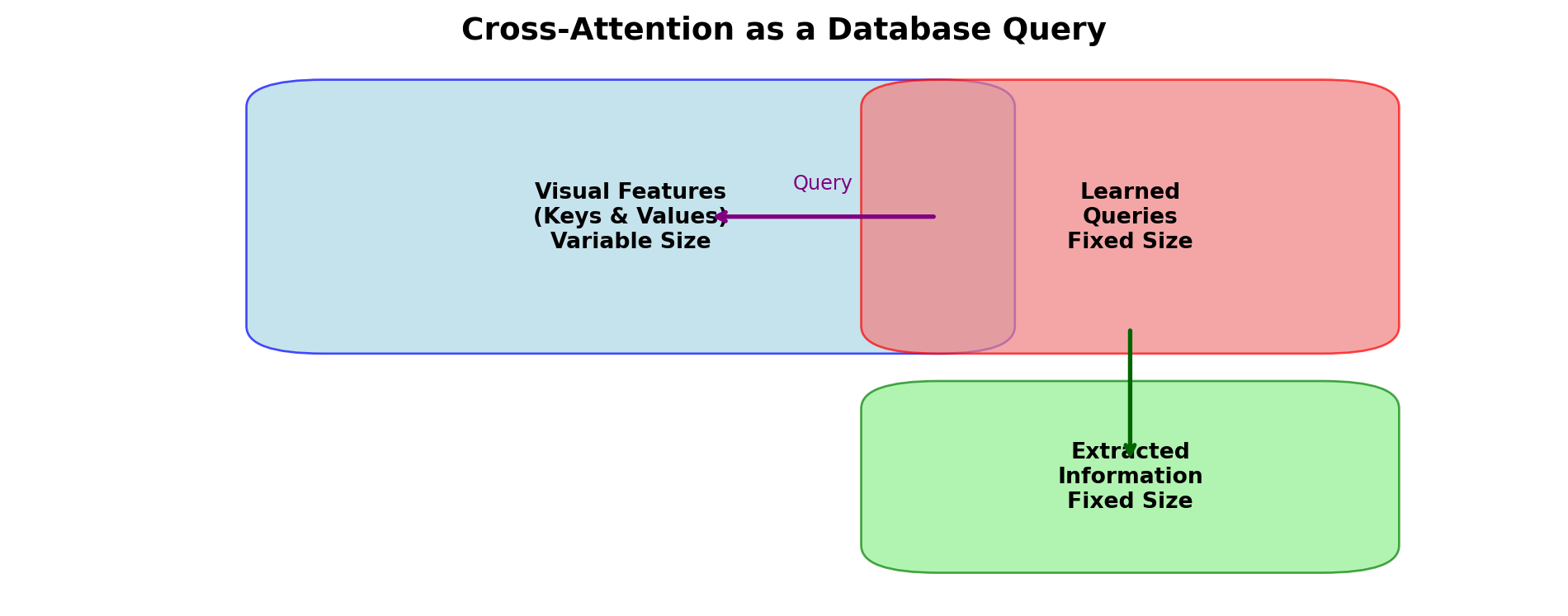
Has a set of pre-written research questions (learned latent queries)
Searches through ALL the books (visual features)
Extracts only the most relevant answers (cross-attention)
Returns a fixed-size summary regardless of library size (fixed output)
The genius is that these “questions” aren’t fixed—they’re learned through training to extract exactly the information needed for the task!
2.2 The Information Bottleneck
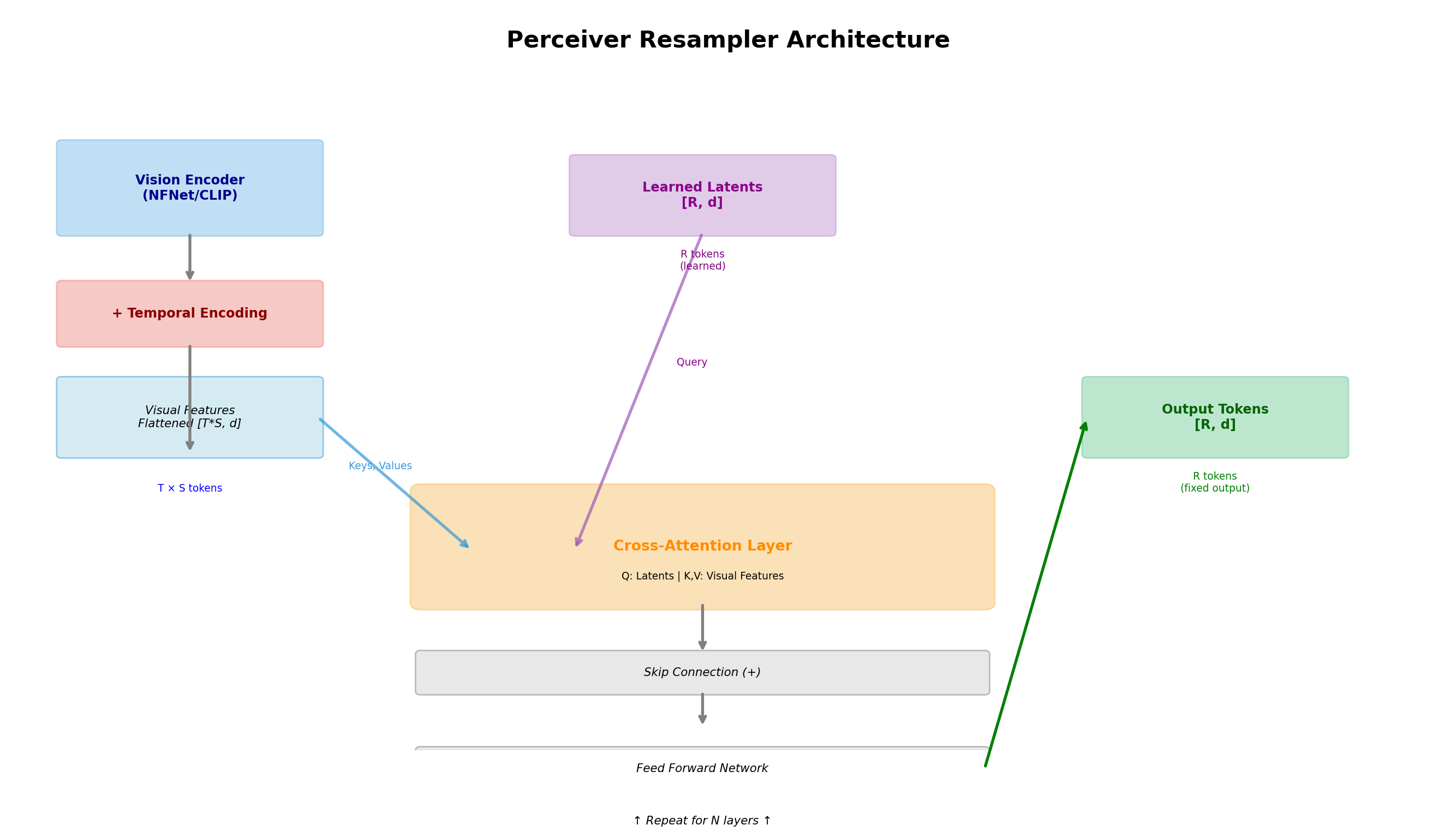
Think of the Perceiver as a funnel:
Visual Input (Variable Size)
     |
     v
┌─────────────────┐
│  T × S tokens   │  -- Thousands of tokens
│   [M, d]        │
└────────┬────────┘
         │
         v  Cross-Attention (Learned Latents as Queries)
┌─────────────────┐
│  R latents      │  -- Fixed size (typically 32-64)
│   [N, d]        │
└────────┬────────┘
         │
         v  Deep Transformer Processing
┌─────────────────┐
│  Output         │  -- Rich, fixed-size representation
│   [N, d]        │
└─────────────────┘
Key insight: By forcing information through a narrow bottleneck, the model learns to preserve only the most task-relevant information.
2.3 Learned Latent Queries: The Secret Sauce
The key insight is that we don’t process visual features directly. Instead, we create a set of learned queries—vectors that start random but are trained to ask the right questions.
import numpy as npimport torchimport torch.nn as nn# Imagine we have 64 "questions" our model can ask# Each question is a vector of, say, 1024 dimensionsnum_latents =64latent_dim =1024# At the start of training, these are randomlearned_latents = torch.randn(num_latents, latent_dim)print(f"Shape of learned latents: {learned_latents.shape}")print(f"First few values of first latent: {learned_latents[0, :5].numpy()}")# Output: torch.Size([64, 1024]) - 64 questions, each with 1024 dimensions
Shape of learned latents: torch.Size([64, 1024])
First few values of first latent: [ 0.10720182 -2.62119    -1.1030511  -0.73111475  0.9736447 ]
These “questions” aren’t text—they’re abstract vectors in a high-dimensional space. Through training, they learn to extract useful information from images.
Key Insight: Not Computed, But Learned!
The learned latents are NOT computed from the input images. They are:
Initialized randomly at the start of training (like any neural network weights)
Learned through backpropagation as the model trains on tasks
Used as queries to extract information from any input
This is fundamentally different from computed features—they’re learnable parameters that specialize through gradient descent!
Part 3: Cross-Attention - The Mechanism
3.1 Understanding Cross-Attention
Before diving deeper, let’s understand cross-attention, the mechanism that powers the Perceiver Resampler.
Standard Self-Attention: Each token attends to every other token in the SAME sequence. \[
\text{Self-Attention}(X) = \text{softmax}\left(\frac{XW_Q (XW_K)^T}{\sqrt{d_k}}\right) XW_V
\]
Cross-Attention: Tokens from one sequence attend to tokens from a DIFFERENT sequence. \[
\text{Cross-Attention}(Q, K, V) = \text{softmax}\left(\frac{QK^T}{\sqrt{d_k}}\right) V
\]
In the Perceiver Resampler: - Queries (Q): Our learned latents (fixed size, e.g., 64 tokens) - Keys (K) & Values (V): Visual features from the image encoder (variable size)
# Vision encoder output shape# T = number of temporal frames (images)# S = spatial tokens per image (e.g., 17×17 = 289 for ViT)# d = feature dimension (e.g., 1024)T, S, d =8, 289, 1024# Example: 8 frames, 289 patches per framevisual_features = torch.randn(T, S, d)print(f"Visual features shape: {visual_features.shape}")print(f"Total tokens: {T * S:,}")# Output: torch.Size([8, 289, 1024]) - 8 images, 289 tokens each = 2,312 tokens
Visual features shape: torch.Size([8, 289, 1024])
Total tokens: 2,312
Step 2: Fourier Position Features ⭐ NEW
The Perceiver uses Fourier features to encode spatial positions. This is crucial because attention is permutation-invariant—it doesn’t know where pixels are located!
def fourier_features(positions, num_bands=64, max_resolution=224):""" Generate Fourier feature position encodings. Args: positions: [..., D] position coordinates in [-1, 1] num_bands: Number of frequency bands max_resolution: Maximum resolution (Nyquist frequency) Returns: Fourier features [..., D * (2*num_bands + 1)] """# Frequency bands equally spaced from 1 to max_resolution/2 freqs = torch.linspace(1, max_resolution /2, num_bands)# Compute sin and cos for each frequency features = []for freq in freqs: features.append(torch.sin(freq * positions)) features.append(torch.cos(freq * positions))# Concatenate with original positions features.append(positions)return torch.cat(features, dim=-1)# Example for a 2D imagex_coords = torch.linspace(-1, 1, 17) # 17 patches widey_coords = torch.linspace(-1, 1, 17) # 17 patches tallxx, yy = torch.meshgrid(x_coords, y_coords, indexing='ij')positions = torch.stack([xx, yy], dim=-1) # [17, 17, 2]fourier_pos = fourier_features(positions, num_bands=64)print(f"Position shape: {positions.shape}")print(f"Fourier features shape: {fourier_pos.shape}")print(f"Feature expansion: 2D position → {fourier_pos.shape[-1]}D features")
Position shape: torch.Size([17, 17, 2])
Fourier features shape: torch.Size([17, 17, 258])
Feature expansion: 2D position → 258D features
Why Fourier Features?
The paper explains: “We use a parameterization of Fourier features that allows us to (i) directly represent the position structure of the input data, (ii) control the number of frequency bands independently of the cutoff frequency, and (iii) uniformly sample all frequencies up to a target resolution.”
Key insight: Unlike learned position embeddings, Fourier features provide a deterministic, high-fidelity representation of position that generalizes better and doesn’t require learning.
Step 3: Flattening Space and Time
The Perceiver Resampler flattens the spatial and temporal dimensions into a single sequence:
After flattening: torch.Size([2312, 1024])
M = T×S = 2312 tokens (variable input size)
Why does this work?
Spatial information is encoded in the feature vectors themselves (via Fourier features)
Temporal information is explicitly added via learned temporal embeddings
The flattening is consistent, so the model learns to handle this specific ordering
Step 4: Temporal Position Encodings
class TemporalEncoding(nn.Module):"""Learned temporal position encodings for video frames"""def__init__(self, max_frames: int=8, feature_dim: int=1024):super().__init__()# Learnable embedding for each time positionself.temporal_embeds = nn.Parameter(torch.randn(max_frames, feature_dim))def forward(self, features: torch.Tensor) -> torch.Tensor:""" Args: features: [T, S, d] tensor of visual features Returns: features with temporal encoding added: [T, S, d] """ T = features.shape[0]# Add temporal encoding to each frame# For each frame t, add self.temporal_embeds[t] to all S spatial tokens encoded = features +self.temporal_embeds[:T].unsqueeze(1)return encoded# Example usagetemporal_encoder = TemporalEncoding(max_frames=8, feature_dim=1024)encoded_features = temporal_encoder(visual_features)print(f"Encoded features shape: {encoded_features.shape}")
Encoded features shape: torch.Size([8, 289, 1024])
Interpolation at Inference Time
Here’s something fascinating: Flamingo was trained with 8 frames, but at inference, it processes 30 frames!
How? By interpolating the temporal embeddings:
# Trained with 8 frames, need 30trained_embeds = temporal_encoder.temporal_embeds # Shape: [8, 1024]# Linear interpolate to get 30 embeddingsfrom torch.nn.functional import interpolateinference_embeds = interpolate( trained_embeds.T.unsqueeze(0), # [1, 1024, 8] size=30, mode='linear', align_corners=False).squeeze(0).T # [1024, 30]
This remarkable property allows the model to generalize to different frame counts!
Step 5: Cross-Attention Layer
class CrossAttentionLayer(nn.Module):"""Cross-attention where latents query visual features"""def__init__(self, latent_dim: int=1024, num_heads: int=8):super().__init__()self.latent_dim = latent_dimself.num_heads = num_headsself.head_dim = latent_dim // num_heads# Query projection: from latentsself.q_proj = nn.Linear(latent_dim, latent_dim)# Key and Value projections: from visual featuresself.k_proj = nn.Linear(latent_dim, latent_dim)self.v_proj = nn.Linear(latent_dim, latent_dim)# Output projectionself.out_proj = nn.Linear(latent_dim, latent_dim)def forward(self, latents: torch.Tensor, visual_features: torch.Tensor) -> torch.Tensor:""" Args: latents: [N, d] - learned latent queries visual_features: [M, d] - flattened visual features Returns: Updated latents: [N, d] """ N = latents.shape[0] M = visual_features.shape[0]# Project to Q, K, V Q =self.q_proj(latents) # [N, d] K =self.k_proj(visual_features) # [M, d] V =self.v_proj(visual_features) # [M, d]# Reshape for multi-head attention Q = Q.view(N, self.num_heads, self.head_dim).transpose(0, 1) # [heads, N, head_dim] K = K.view(M, self.num_heads, self.head_dim).transpose(0, 1) # [heads, M, head_dim] V = V.view(M, self.num_heads, self.head_dim).transpose(0, 1) # [heads, M, head_dim]# Compute attention scores: Q @ K^T scores = torch.matmul(Q, K.transpose(-2, -1)) / (self.head_dim **0.5) # [heads, N, M]# Apply softmax to get attention weights attn_weights = torch.softmax(scores, dim=-1) # [heads, N, M]# Apply attention to values attended = torch.matmul(attn_weights, V) # [heads, N, head_dim]# Merge heads attended = attended.transpose(0, 1).contiguous().view(N, self.latent_dim) # [N, d]# Output projection output =self.out_proj(attended)return output# Complexity checkN, M, d =64, 2312, 1024# Example dimensionsprint(f"Cross-attention complexity: O(N×M) = O({N}×{M}) = O({N*M:,})")print(f"Self-attention complexity: O(M²) = O({M}²) = O({M**2:,})")print(f"Speedup: {M**2/ (N*M):.1f}x faster!")
You might wonder: What do these learned latents actually represent?
The Perceiver paper describes this beautifully: the latents act like cluster centers in a soft clustering algorithm. Each latent specializes in extracting a certain type of information.
def visualize_latent_specialization():"""Conceptual visualization of how latents might specialize""" fig, axes = plt.subplots(2, 4, figsize=(14, 7)) fig.suptitle('How Learned Latents Might Specialize\n(Conceptual)', fontsize=14, weight='bold')# Conceptual specializations specializations = [ ("Object Detector", "focuses on discrete objects"), ("Action Analyzer", "captures motion and activity"), ("Spatial Mapper", "understands spatial relationships"), ("Color Specialist", "attends to color patterns"), ("Texture Expert", "focuses on surface properties"), ("Scene Context", "understands overall context"), ("Temporal Tracker", "tracks changes over time"), ("Global Integrator", "holistic scene understanding") ] np.random.seed(42)for idx, (ax, (name, desc)) inenumerate(zip(axes.flat, specializations)):# Create a conceptual attention pattern attn_pattern = np.random.rand(16, 16)# Make it look more like real attention (some structure) center = (7, 7)for i inrange(16):for j inrange(16): dist = np.sqrt((i-center[0])**2+ (j-center[1])**2) attn_pattern[i, j] *= np.exp(-dist /5) attn_pattern = attn_pattern / attn_pattern.sum() im = ax.imshow(attn_pattern, cmap='viridis', aspect='auto') ax.set_title(f'Latent {idx+1}: {name}\n{desc}', fontsize=9) ax.axis('off') plt.tight_layout() plt.show()print("\n"+"="*70)print("LATENT SPECIALIZATION EXAMPLES")print("="*70) examples = ["Latent 1: Attends to object boundaries and shapes","Latent 2: Focuses on human figures and poses","Latent 3: Tracks moving objects across frames","Latent 4: Identifies background scene context","...","Latent 64: Captures fine-grained texture details" ]for ex in examples:print(f" • {ex}")print("="*70)visualize_latent_specialization()
======================================================================
LATENT SPECIALIZATION EXAMPLES
======================================================================
  • Latent 1: Attends to object boundaries and shapes
  • Latent 2: Focuses on human figures and poses
  • Latent 3: Tracks moving objects across frames
  • Latent 4: Identifies background scene context
  • ...
  • Latent 64: Captures fine-grained texture details
======================================================================
Key insight from the paper:
“The latent vectors in this case act as queries which extract information from the input data and need to be aligned in such a way that they extract the necessary information to perform the prediction task.”
Through training, gradients flow back and adjust these latents so they ask “better questions”—questions that extract information useful for the task at hand.
Not Traditional Clustering!
The Perceiver authors call this “end-to-end clustering” but it’s important to understand:
❌ NOT K-means or any traditional clustering algorithm
❌ NOT pre-computed from features
✅ IS a soft, differentiable clustering that emerges from gradient descent
✅ IS task-dependent—latents learn to cluster information relevant to the task
The “clusters” are implicit in the attention patterns that develop during training!
Part 7: The Flamingo Integration
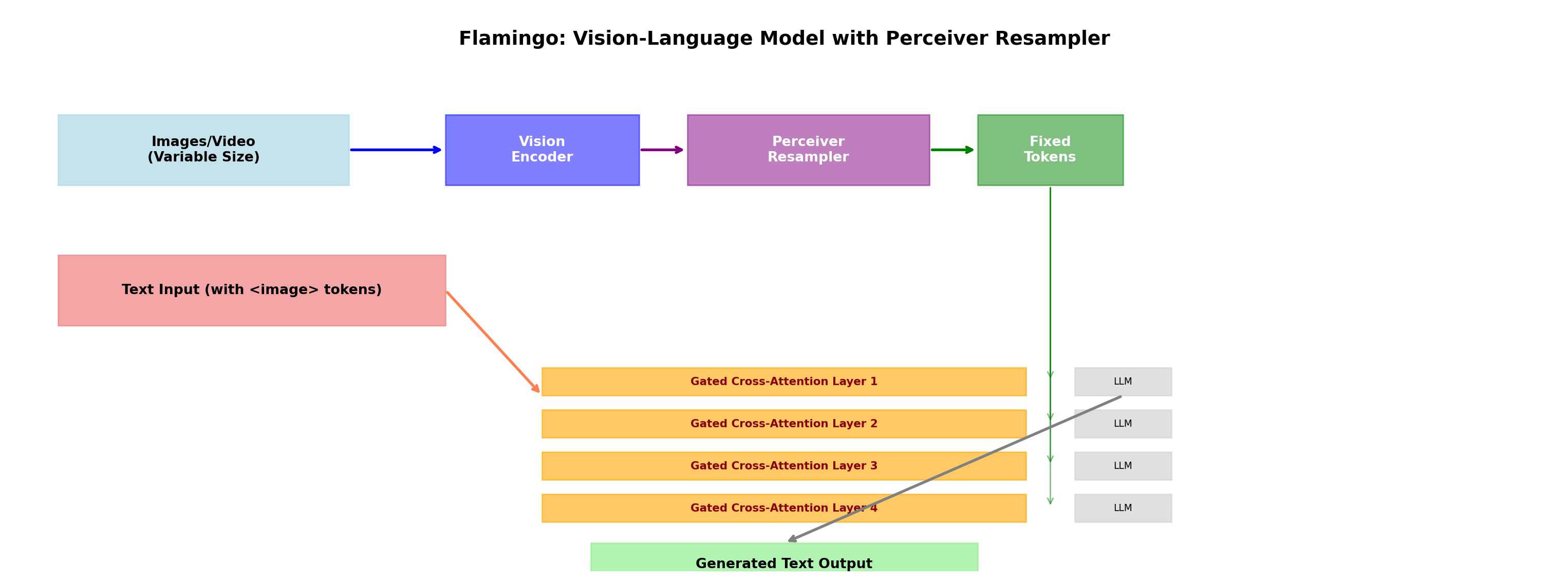
7.1 How Flamingo Uses the Perceiver Resampler
The Perceiver Resampler was popularized by DeepMind’s Flamingo model. Let’s see how it fits into the complete architecture:
7.2 Gated Cross-Attention: Mixing Vision and Language
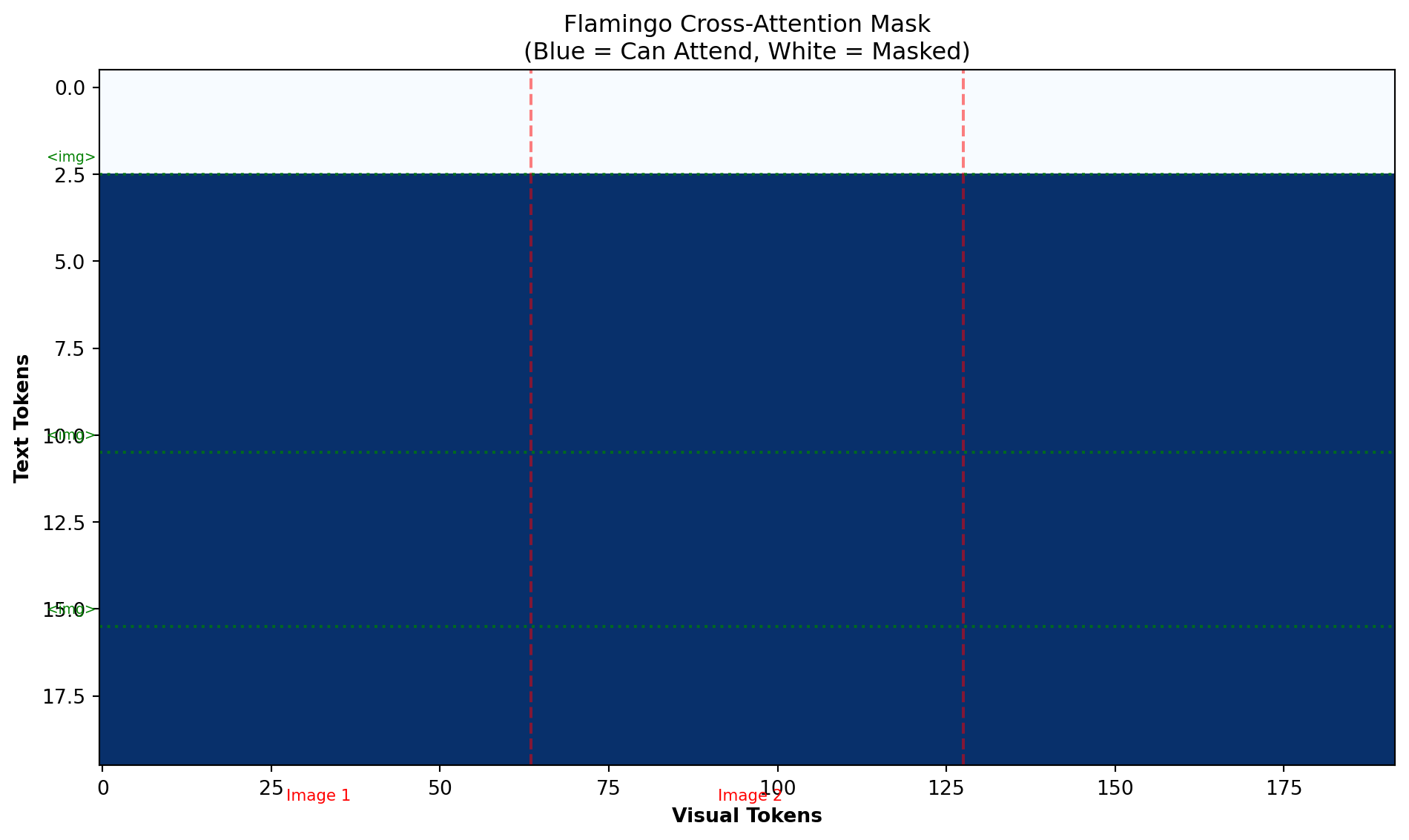
After the Perceiver Resampler produces fixed-size visual tokens, Flamingo uses gated cross-attention to inject this information into the language model:
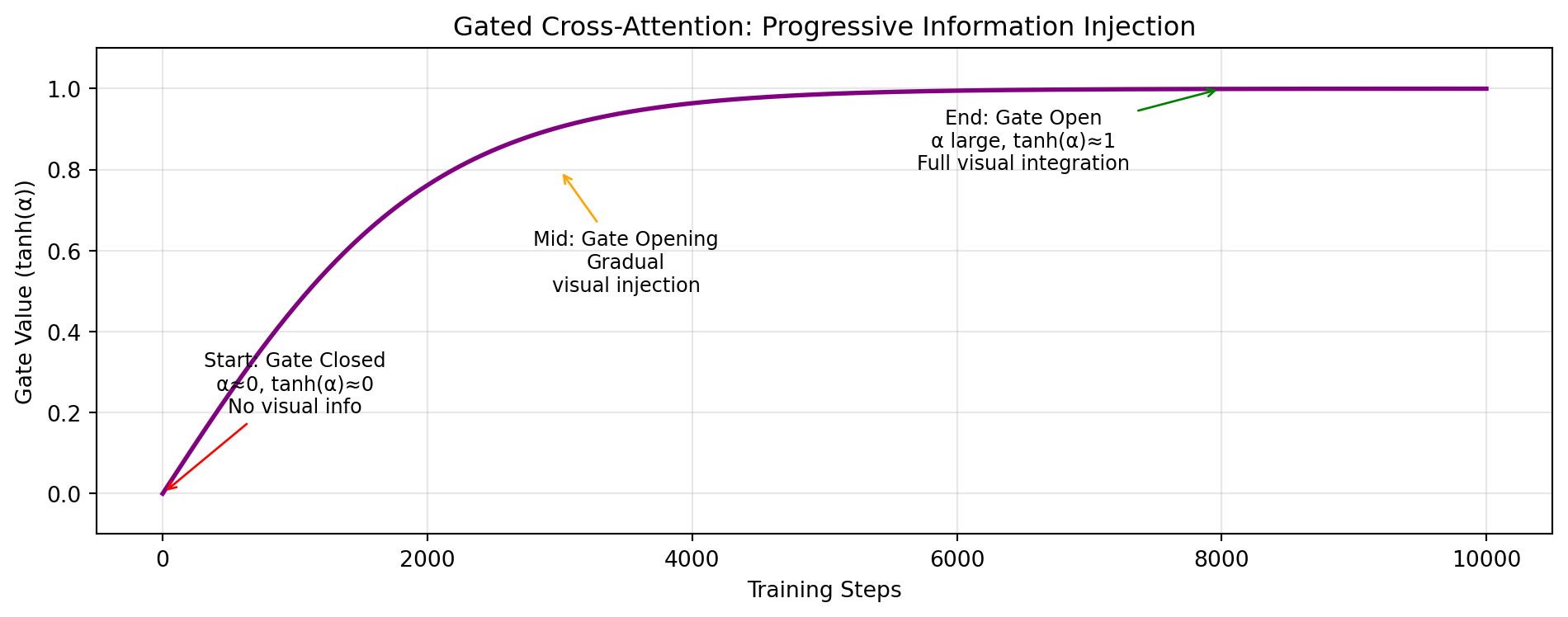
class GatedCrossAttention(nn.Module):""" Cross-attention with gating for controlled visual information injection. The gate starts closed (alpha=0) and gradually opens during training. """def__init__(self, lang_dim: int=4096, visual_dim: int=1024, num_heads: int=8):super().__init__()self.cross_attn = nn.MultiheadAttention( embed_dim=lang_dim, num_heads=num_heads, batch_first=True )# Learnable gate parameter (initialized to 0 = closed)self.alpha = nn.Parameter(torch.zeros(1))def forward(self, lang_tokens: torch.Tensor, visual_tokens: torch.Tensor) -> torch.Tensor:""" Args: lang_tokens: [batch, seq_len, lang_dim] - language model tokens visual_tokens: [batch, num_visual, visual_dim] - resampled visual tokens Returns: Updated lang_tokens with visual information injected """# Cross-attention: language queries, visual keys/values attn_out, _ =self.cross_attn( query=lang_tokens, key=visual_tokens, value=visual_tokens )# Tanh gate: controls how much visual information flows through# tanh(0) = 0 (closed), tanh(large) ≈ 1 (open) gate = torch.tanh(self.alpha) gated_output = gate * attn_out# Skip connection: preserve original language understandingreturn lang_tokens + gated_output# Simulate training progressionprint("\n"+"="*60)print("GATED CROSS-ATTENTION: TRAINING PROGRESSION")print("="*60)# Training stepssteps = [0, 1000, 3000, 5000, 8000, 10000]alpha_values = [0, 0.5, 1.5, 2.5, 4.0, 5.0]print(f"{'Step':<10}{'α (raw)':<10}{'tanh(α) (gate)':<15}{'Visual Info Flow'}")print("-"*60)for step, alpha inzip(steps, alpha_values): gate = np.tanh(alpha) bar ="█"*int(gate *20)print(f"{step:<10}{alpha:<10.2f}{gate:<15.3f}{bar}")print("="*60)
When training Flamingo, the cross-attention gate starts closed (α=0 → tanh(α)=0). This is crucial:
Protects the pre-trained LLM: The language model already knows how to process text—don’t disrupt it initially
Allows gradual adaptation: Visual information is slowly integrated, preventing shock to the system
Prevents catastrophic forgetting: The LLM doesn’t suddenly “forget” how to handle text
Stabilizes training: The model learns to balance textual and visual information gradually
It’s like introducing a new team member gradually rather than throwing them into the deep end!
Part 8: Training Tips & Common Pitfalls
8.1 Best Practices
✅ DO: Recommended Practices
Latent Initialization: - Use small random initialization (std ~0.02) - Truncated normal with bounds [-2, 2] works well - The paper found performance is robust to initialization scale
Architecture Choices: - num_latents: 32-128 (64 is a good default) - num_layers: 4-6 for most applications - num_heads: 8 is standard - feature_dim: Match your vision encoder output (usually 768 or 1024)
Training Tips: - Use learning rate warmup for latents (they’re learning “from scratch”) - Consider layer-wise learning rate decay - Weight sharing across layers reduces overfitting significantly
❌ DON’T: Common Pitfalls
Initialization Issues: - Don’t initialize latents with large values (can cause instability) - Don’t use zero initialization (no gradient flow initially)
Architecture Mistakes: - Don’t make N (num_latents) too small (<32) - bottleneck too aggressive - Don’t make N too large (>512) - loses the efficiency benefit - Don’t forget temporal encodings for video - model won’t understand time!
Training Mistakes: - Don’t freeze latents initially - they need to learn! - Don’t use too high learning rate for latents - they’re sensitive - Don’t forget to interpolate temporal embeddings when using different frame counts
8.2 Hyperparameter Guide
import pandas as pd# Create a hyperparameter reference tablehyperparams = {'Hyperparameter': ['num_latents (N)','num_layers (L)','num_heads','feature_dim (d)','max_frames' ],'Typical Values': ['64 (Flamingo)','4-6','8','1024','8 (trainable)' ],'Effect': ['More latents → more info, but slower','More layers → deeper processing','More heads → richer attention patterns','Larger → more expressive','Higher → need interpolation at inference' ],'Sweet Spot': ['32-128 (task-dependent)','4-6 (diminishing returns after)','8 (standard)','768-1024 (match encoder)','8 (interpolate beyond)' ]}df = pd.DataFrame(hyperparams)print("\nHYPERPARAMETER REFERENCE TABLE")print("="*80)print(df.to_string(index=False))print("="*80)
HYPERPARAMETER REFERENCE TABLE
================================================================================
 Hyperparameter Typical Values                                   Effect                      Sweet Spot
num_latents (N)  64 (Flamingo)     More latents → more info, but slower         32-128 (task-dependent)
 num_layers (L)            4-6          More layers → deeper processing 4-6 (diminishing returns after)
      num_heads              8   More heads → richer attention patterns                    8 (standard)
feature_dim (d)           1024                 Larger → more expressive        768-1024 (match encoder)
     max_frames  8 (trainable) Higher → need interpolation at inference          8 (interpolate beyond)
================================================================================
Perceiver IO - Follow-up with output cross-attention
Set Transformer - Precursor work on cross-attention for sets
Acknowledgments
This blog is based on insights from: - The Perceiver paper by Jaegle et al. (DeepMind, 2021) - The Flamingo paper by Alayrac et al. (DeepMind, 2022) - The Set Transformer paper by Lee et al. (2019) - The excellent explainer by Daniel Warfield on Flamingo - StackExchange discussions on learned latents
Happy Learning! May your attention mechanisms always attend to what matters! 🎯
Questions or feedback? Feel free to reach out or open an issue on GitHub!